pandas列名
|
默认列名为0,1,2,...
import pandas as pd
a=pd.DataFrame([1])
a.to_csv("a.csv",index=False)

!cat a.csv
0
1
|
|
指定列名 import pandas as pd df2 = pd.DataFrame( [ ["aa","bb"], ["a1","b1"], ["a2","b2"] ], columns=['a', 'b']) |
|
列重命名
import pandas as pd
b = pd.DataFrame(data=[[1,2,3,4]],columns=["tid","cardno","ids","times"])
b.rename(columns={"cardno": "card_num"}, inplace=True)
|
import pandas as pd
# 示例DataFrame
data = {
'A': [1, 2, 3],
'B': [4.5, 5.6, 6.7],
'C': ['a', 'b', 'c'],
'D': [True, False, True],
'E': [pd.Timestamp('20230101'), pd.Timestamp('20230102'), pd.Timestamp('20230103')],
}
df = pd.DataFrame(data)
def non_numeric_colnames(data_pd):
"""获取pandas数表非数字列的列名"""
# 获取所有数字类型的列名
numeric_cols = data_pd.select_dtypes(include=['int64', 'float64','int16','int32','float32']).columns
# 获取所有非数字列的列名
non_numeric_cols = data_pd.columns.difference(numeric_cols)
return non_numeric_cols.tolist()
non_numeric_colnames(df) ['C', 'D', 'E'] 对于非标准或复杂数据类型 (如日期时间对象datetime64[ns]、布尔值bool、分类类型category等), 它们通常不被视为数字类型,并会出现在non_numeric_cols中。 如果你需要排除这些类型, 你可能需要手动调整select_dtypes()的include和exclude参数 或使用更复杂的逻辑来识别它们。 |
|
全局设置
# 设置Pandas显示选项以显示所有列
pd.set_option('display.max_columns', None)
pd.set_option('display.max_rows', None)
临时设置
with pd.option_context('display.max_columns', None):
print(df)
|
# 将所有列名转换为大写 df.columns = df.columns.str.upper()
import pandas as pd
# 创建一个示例 DataFrame
data = {
'name': ['Alice', 'Bob', 'Charlie'],
'age': [25, 30, 35],
'city': ['New York', 'Los Angeles', 'Chicago']
}
df = pd.DataFrame(data)
# 打印原始 DataFrame
print("原始 DataFrame:")
print(df)
# 将所有列名转换为大写
df.columns = df.columns.str.upper()
# 打印转换后的 DataFrame
print("\n转换后的 DataFrame:")
print(df)
|
列的类型
import pandas as pd
# 示例 DataFrame
df = pd.DataFrame({
'A': [1, 2, 3], # 整数列
'B': [1.1, 2.2, 3.3], # 浮点数列
'C': ['x', 'y', 'z'], # 字符串列
'D': [True, False, True] # 布尔列
})
# 筛选数字列(int, float)的列名
numeric_cols = df.select_dtypes(include=['int', 'float']).columns.tolist()
print(numeric_cols) #['A', 'B']
include=['int'] int8, int16, int32, int64
include=['float'] float16, float32, float64
include=['number'] 所有数值类型(int + float)
|
numeric_cols = [
col for col in df.columns
if pd.api.types.is_numeric_dtype(df[col])
]
print(numeric_cols)
pd.api.types.is_numeric_dtype() 会识别所有数值类型(包括 int、float 和 bool)。 如果不想包含布尔列,可以额外排除 bool:
numeric_cols = [
col for col in df.columns
if pd.api.types.is_numeric_dtype(df[col]) and not pd.api.types.is_bool_dtype(df[col])
]
|
import numpy as np numeric_cols = df.select_dtypes(include=[np.number]).columns.tolist() print(numeric_cols) np.number 会匹配所有 NumPy 数值类型(包括 int、float、complex 等)。 |
non_numeric = ['object', 'category', 'bool', 'datetime'] numeric_cols = df.select_dtypes(exclude=non_numeric).columns.tolist() print(numeric_cols) ['A', 'B'] |
|
|
缺少列补0
import torch
import pandas as pd
a=torch.linspace(start=1,end=12,steps=12).reshape(3,4)
a = pd.DataFrame(a,columns=["A","B","C","D"])
print(a)
print("------------------------------------")
b =torch.linspace(start=1,end=6,steps=6).reshape(2,3)
b = pd.DataFrame(b,columns=["A","B","D"])
print(b)
print("------------------------------------")
def write(obj,file_path):
"""
直接将对象转字符串写入文件,这样可以在文件打开时,看到原内容,还可以进行搜索
"""
ss = str(obj)
with open(file_path,"w",encoding="utf-8") as f:
f.write(ss)
def read(file_path):
with open(file_path,'r',encoding="utf-8") as f:
c = eval(f.read())
return c
cols_path="cols_more"
write(a.columns.to_list(),cols_path)
cols_more = read(cols_path)
# 定义一个空结构可以保持原列的顺序
b2 = pd.DataFrame()
for col in cols_more:
if col in b:
b2[col] = b[col]
else:
b2[col] = 0
b2[col] = b2[col].astype("float32")
print(b2)
print("------------------------------------")
print(b2.dtypes)
A B C D
0 1.0 2.0 3.0 4.0
1 5.0 6.0 7.0 8.0
2 9.0 10.0 11.0 12.0
------------------------------------
A B D
0 1.0 2.0 3.0
1 4.0 5.0 6.0
------------------------------------
A B C D
0 1.0 2.0 0.0 3.0
1 4.0 5.0 0.0 6.0
------------------------------------
A float32
B float32
C float32
D float32
dtype: object
如果数据量大,pd.concat能提供更高的性能
# 定义一个空结构可以保持原列的顺序
b2 = pd.DataFrame()
for col in cols_more:
if col in b:
b2 = pd.concat([b2,b[col]],axis=1)
else:
tmp = pd.DataFrame(torch.zeros(b.shape[0]))
b2 = pd.concat([b2,tmp],axis=1)
print(b2)
print("------------------------------------")
print(b2.dtypes)
行转列
# 标识列 table_cols = ['id', 'name'] # 使用melt函数进行行转列操作 melted_df = df.melt(id_vars=table_cols, var_name='key', value_name='value') |
|
|
|
|
|
|
|
|
pandas 列转list/ndarray
card_pd = data_smp_card["卡号"] card_pd.values.tolist() 或 card_pd.tolist() 有没有values效果一样,都可以转为python list 当DataFrame只有一列也没有列名时
import pandas as pd
a=pd.DataFrame([1,2,3])
a.to_csv("a.csv",index=False)
a=pd.read_csv("a.csv")
没有列名实际是没有手工指定列名称,这种情况下,pandas使用数字为列命名,
读取这样的列方式如下:
a["0"]
0 1
1 2
2 3
Name: 0, dtype: int64
a["0"].tolist()
[1, 2, 3]
|
import pandas as pd
import numpy as np
# 创建一个示例 DataFrame
data = {
'column1': [1, 2, 3, 4, 5],
'column2': [10, 20, 30, 40, 50]
}
df = pd.DataFrame(data)
# 将 'column1' 转换为 NumPy 数组
numpy_array = df['column1'].values
# 打印结果
print(numpy_array)
print(type(numpy_array)) # 这将显示 class 'numpy.ndarray'
|
|
|
|
|
|
|
列转map
import pandas as pd
# 示例 DataFrame
data = {
'feature_id': [1, 2, 3, 4],
'feature_column': ['A', 'B', 'C', 'D']
}
df = pd.DataFrame(data)
# 将 DataFrame 转换为字典
feature_map = {row['feature_column']: row['feature_id'] for index, row in df.iterrows()}
print(feature_map)
{'A': 1, 'B': 2, 'C': 3, 'D': 4}
|
# 使用 zip 和 df.values 将 DataFrame 转换为字典 feature_map = dict(zip(df['feature_column'], df['feature_id'])) print(feature_map)
{'A': 1, 'B': 2, 'C': 3, 'D': 4}
这种方法通常比 iterrows() 更高效, 因为它直接操作底层的 NumPy 数组,避免了 Python 循环的开销。 |
import pandas as pd
# 假设你有一个如下的DataFrame
data = {
'param_id': ['id1', 'id2', 'id3', 'id4'],
'param_value': ['123', '45.67', 'hello', 'True'],
'value_type': [int, float, str, bool] # 注意:这里需要实际的int, float等类型,而不是字符串表示
# 在实际情况下,value_type列可能包含表示类型的字符串,如'int', 'float'等,你需要先将其转换为实际的类型
}
# 由于value_type列通常包含的是表示类型的字符串而不是实际的类型对象,我们需要一个映射来转换这些字符串到实际的类型
type_mapping = {
'int': int,
'float': float,
'str': str,
'bool': lambda x: eval(x) # 这里假设bool类型的值在param_value中以能够转换为整数的形式表示(如'1'为True,'0'为False)
# 注意:对于bool类型的转换,你可能需要根据实际情况调整逻辑,因为'True'/'False'字符串可以直接用bool()转换,但数字则需要特殊处理
}
# 为了示例,我们暂时假设value_type列已经包含了正确的类型对象(在实际应用中,你需要使用type_mapping来转换)
# df = pd.DataFrame(data) # 如果直接使用上面的data,则下面的转换代码需要调整以使用type_mapping
# 实际应用中,你可能需要先转换value_type列的值
# 假设data中的value_type列实际上是这样的字符串列表:['int', 'float', 'str', 'bool']
# 那么你需要先转换它:
data['value_type'] = [type_mapping[t] for t in ['int', 'float', 'str', 'bool']] # 这里使用了硬编码的列表来模拟转换过程
df = pd.DataFrame(data)
# 现在,我们可以遍历DataFrame来创建字典
result_dict = {}
for index, row in df.iterrows():
param_id = row['param_id']
param_value = row['param_value']
value_type_func = row['value_type']
# 应用转换函数
converted_value = value_type_func(param_value) if param_value != 'None' else None # 处理可能的'None'字符串(如果需要)
# 将转换后的值添加到字典中
result_dict[param_id] = converted_value
# 注意:上面的代码中,我添加了一个处理'None'字符串的检查,但在你的实际数据中可能不需要(或者需要不同的处理方式)
# 'None'字符串的处理取决于你的数据是否可能包含这样的值,以及你希望如何处理它们
# 打印结果字典
print(result_dict)
{'id1': 123, 'id2': 45.67, 'id3': 'hello', 'id4': True}
方法封装
import pandas as pd
# 假设你有一个如下的DataFrame
data = {
'param_id': ['id1', 'id2', 'id3', 'id4'],
'param_value': ['123', '45.67', 'hello', 'True'],
'value_type': ['int', 'float', 'str', 'bool'] # 注意:这里需要实际的int, float等类型,而不是字符串表示
# 在实际情况下,value_type列可能包含表示类型的字符串,如'int', 'float'等,你需要先将其转换为实际的类型
}
def value_map(data,key_name="param_id",value_name="param_value",value_type="value_type"):
"""按'int', 'float', 'str', 'bool'等类型对数据进行转换
"""
type_mapping = {
'int': int,
'float': float,
'str': str,
'bool': lambda x: eval(x)
}
data['value_type'] = [type_mapping[t] for t in ['int', 'float', 'str', 'bool']] # 这里使用了硬编码的列表来模拟转换过程
df = pd.DataFrame(data)
result_dict = {}
for index, row in df.iterrows():
param_id = row[key_name]
param_value = row[value_name]
value_type_func = row[value_type]
# 应用转换函数
converted_value = value_type_func(param_value) if param_value != 'None' else None # 处理可能的'None'字符串(如果需要)
# 将转换后的值添加到字典中
result_dict[param_id] = converted_value
return result_dict
# 打印结果字典
result_dict = value_map(data)
print(result_dict)
{'id1': 123, 'id2': 45.67, 'id3': 'hello', 'id4': True}
|
import pandas as pd
from tpf import value_map
# 假设你有一个如下的DataFrame
data = {
'param_id': ['id1', 'id2', 'id3', 'id4'],
'param_value': ['123', '45.67', 'hello', 'True'],
'value_type': ['int', 'float', 'str', 'bool'] # 注意:这里需要实际的int, float等类型,而不是字符串表示
# 在实际情况下,value_type列可能包含表示类型的字符串,如'int', 'float'等,你需要先将其转换为实际的类型
}
# 打印结果字典
result_dict = value_map(data,value_name="param_value",value_type_name="value_type")
print(result_dict)
{'id1': 123, 'id2': 45.67, 'id3': 'hello', 'id4': True}
|
|
|
一列拆多列
```
label_cols = ['label1', 'label2','label3', 'label4','label5', 'label6']
# 使用apply + pd.Series,更灵活处理不同长度的拆分结果
df[label_cols] = df['label'].apply(
lambda x: pd.Series(x.split('-') if '-' in x else [None])
)
df[:3]
```
|
|
|
|
|
|
|
|
|
|
|
|
|
|
排序
# 按 'age' 列降序排序 df_sorted = df.sort_values(by='age', ascending=False) print(df_sorted) # 原地按 'age' 列升序排序 df.sort_values(by='age', inplace=True) print(df) |
# 按 'age' 列升序和 'salary' 列降序排序 df_sorted = df.sort_values(by=['age', 'salary'], ascending=[True, False]) print(df_sorted) |
|
训练与预测都按列的升序排列 X = X.loc[:, sorted(X.columns)] #训练时按序列排列 sort_index
import pandas as pd
# 假设 df 是你的原始数据表
df = pd.DataFrame({
'B': [1, 2, 3],
'A': [4, 5, 6],
'C': [7, 8, 9]
})
print("原始数据表:")
print(df)
# 按列名的升序重新排列
df = df.sort_index(axis=1)
print("\n按列名升序排列后的数据表:")
print(df)
Selection deleted
原始数据表:
B A C
0 1 4 7
1 2 5 8
2 3 6 9
按列名升序排列后的数据表:
A B C
0 4 1 7
1 5 2 8
2 6 3 9
|
|
|
|
|
pandas取部分列
|
取一列 取一列: df2.a df2['a']
----------------------------------------------------------
|
|
前多少列 import pandas as pd import numpy as np df2 = pd.DataFrame(np.array( [ [1, 2, 3], [4, 5, 6], [7, 8, 9] ]), columns=['a', 'b', 'c']) # 前两列 df2[df2.columns[:2]]
-----------------------------------------------------
|
import pandas as pd
df = pd.DataFrame({
'A': [1, 2, 3],
'B': [4, 5, 6],
'C': [7, 8, 9]
})
# 使用两种方式选择列
cols_to_select = ['A', 'C']
# 方法1
result1 = df[cols_to_select]
# 方法2
result2 = df.loc[:, cols_to_select]
# 结果相同
print(result1.equals(result2)) # 输出: True
df[str_identity] 基本用法:这是Pandas的"字典式"选择方式 特点: 只能用于选择列(不能用于选择行) 如果str_identity是一个列名,返回该列作为Series 如果str_identity是列名的列表,返回这些列组成的DataFrame 不支持切片或其他高级索引 性能:通常比.loc稍快,因为它是专门为列选择优化的 df.loc[:, str_identity] 基本用法:这是Pandas的标签索引方式 特点: 更通用,可以用于行和列的选择(通过第一个参数选择行,第二个参数选择列) 支持切片、布尔数组、函数等高级索引 当只选择列时,:表示选择所有行 如果str_identity是单个列名,返回该列作为Series 如果str_identity是列名的列表,返回这些列组成的DataFrame 性能:稍微慢一些,因为它是更通用的索引方式 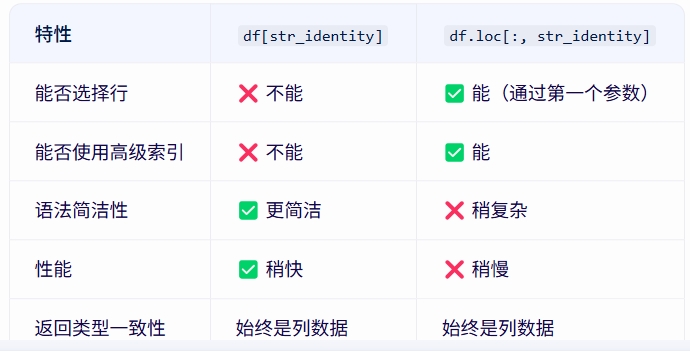
使用建议 如果只需要简单地选择一列或多列,使用df[str_identity]更简洁高效 如果需要更复杂的索引操作(如同时选择行和列、使用条件索引等),使用df.loc[:, str_identity] 对于重排列的操作,两者在功能上是等价的, 选择哪种主要取决于代码的可读性和上下文需求 |
|
删除所有包含 NaN 的列
import pandas as pd
# 示例 DataFrame
df = pd.DataFrame({
'A': [1, 2, 3],
'B': [4, None, 6],
'C': [None, None, None]
})
# 删除所有包含 NaN 的列
df_cleaned = df.dropna(axis=1)
print("原始 DataFrame:")
print(df)
print("\n删除含 NaN 的列后:")
print(df_cleaned)
原始 DataFrame:
A B C
0 1 4.0 None
1 2 NaN None
2 3 6.0 None
删除含 NaN 的列后:
A
0 1
1 2
2 3
删除全部值为 NaN 的列 df_cleaned = df.dropna(axis=1, how='all')
df_cleaned
A B
0 1 4.0
1 2 NaN
2 3 6.0
-------------------------------------------------------------------- |
|
|
去重
import pandas as pd
# 假设df是你的DataFrame
# 创建一个示例DataFrame
data = {
'ACCT_NUM': [1001, 1001, 1002, 1003, 1003, 1003],
'PARTY_ID': [1, 2, 3, 4, 5, 6]
}
df = pd.DataFrame(data)
# 使用groupby和first方法去重
# 这里groupby('ACCT_NUM')会将数据按照ACCT_NUM列的值进行分组
# 然后.first()方法会从每个组中取出第一行数据
df_unique = df.groupby('ACCT_NUM').first()
# 注意:这将返回一个只包含原始DataFrame中ACCT_NUM作为索引的DataFrame
# 如果你想要将ACCT_NUM设置为普通列,并重置索引,可以使用reset_index()方法
df_unique = df_unique.reset_index()
print(df_unique)
ACCT_NUM PARTY_ID
0 1001 1
1 1002 3
2 1003 4
这段代码首先创建了一个示例DataFrame df,它包含重复的ACCT_NUM值。
然后,使用groupby('ACCT_NUM').first()方法
按照ACCT_NUM列的值对数据进行分组,
并从每个组中取出第一条记录。
最后,通过reset_index()方法将ACCT_NUM列重置为普通列,而不是索引。
|
unique_elements = df['column1'].unique() |
|
|
|
|
|
|
pandas 条件过滤
|
按某一列过滤
import torch
import pandas as pd
a = torch.linspace(start=1,end=12,steps=12).reshape(3,4)
a = pd.DataFrame(a,columns=["A","B","C","D"])
print(a)
A B C D
0 1.0 2.0 3.0 4.0
1 5.0 6.0 7.0 8.0
2 9.0 10.0 11.0 12.0
print(a[a.C>5])
A B C D
1 5.0 6.0 7.0 8.0
2 9.0 10.0 11.0 12.0
print(a[a.A==1])
A B C D
0 1.0 2.0 3.0 4.0
字符串列==某值
import pandas as pd

df2 = pd.DataFrame(
[
["aa","bb"],
["a1","b1"],
["a2","b2"]
], columns=['a', 'b'])
df2[df2.a.eq("aa")]
包含一些值 df2[df2.a.isin(["a1","a2"])] a b 1 a1 b1 2 a2 b2 |
|
去掉一些值 df2.drop(df2[df2.a.isin(["a1","a2"])].index, inplace=True) print(df2) a b 0 aa bb |
t_1 = len(df.query("feature_value_571 > 22319369 and sample_type == 1"))
tpr = t_1 / label_1_count
tpr
t_1 = len(df[(df["feature_value_571"] > 22319369) & (df["sample_type"] == 1)])
tpr = t_1 / label_1_count
tpr
pandas 多条件过滤 pandas单独某个列是一个Series,功能强大,可直接进行比较运算, 组合条件表达式得到一个真假列表,然后传给data,就能过滤出条件为真的数据 data[(data.aa ==1) & (data.bb > 1)] 取一列中以is_开头的另外一列的值
import pandas as pd

# 创建 DataFrame
data = {
    'feature_id': ['f0001', 'f0002'],
    'feature_column': ['feature_value_1', 'is_feature_value_2']
}
df = pd.DataFrame(data)

# 将 feature_column 列的值转换为小写,并过滤出以 is_ 开头的行
filtered_df = df[df['feature_column'].str.lower().str.startswith('is_')]

# 提取 feature_id 列的值
feature_id_list = filtered_df['feature_id'].tolist()

# 输出结果
print(feature_id_list)
|
|
按列操作:将所有小于0的数据替换为0
import numpy as np
import pandas as pd

a = {"aa":1,"bb":2}
b = {"bb":20,"aa":10,"cc":30}
c = {"aa":-1,"bb":-2,"cc":0}

df1 = pd.DataFrame(data=a,index=[0])
df2 = pd.DataFrame(data=b,index=[1])
df3 = pd.DataFrame(data=c,index=[2])

data = pd.concat([df1,df2,df3])
for col_name in data:
    data.loc[data[col_name]<0,col_name] = 0

print(data)
"""
    aa  bb    cc
0   1   2   NaN
1  10  20  30.0
2   0   0   0.0
"""
|
|
提取符合条件的行
import pandas as pd
import math

df2 = pd.DataFrame(
[
[1, 2, 3],
[4, 5, 6],
[7, 8, 9],
[1, 2, -4],
[4, 5, 0],
[7, -9, 9],
], columns=['a', 'b', 'c'])

cols = df2.columns
for col in cols:
    df2 = df2[(df2[col]>=0)]


df2
      a 	b 	c
0 	1 	2 	3
1 	4 	5 	6
2 	7 	8 	9
4 	4 	5 	0
|
|
|
|
|
列值替换
import pandas as pd

# 假设这是你的DataFrame
data = {
    '列的名称': ['col1', 'col2', 'col3'],
    '列的类型': ['VARCHAR2', 'DATE', 'NUMBER'],
    '列的长度': [10, None, 20]
}
df = pd.DataFrame(data,dtype=str)
df.fillna("",inplace=True)
print(df)
    列的名称      列的类型 列的长度
0      col1     VARCHAR2   10
1      col2         DATE
2      col3       NUMBER   20
# 创建一个替换映射字典
type_mapping = {
    'VARCHAR2': 'varchar',
    'DATE': 'datetime',
    'NUMBER': 'bigint'
}

# 使用.replace()方法替换'列的类型'列中的值
df['列的类型'] = df['列的类型'].replace(type_mapping)

# 显示结果
print(df)
    列的名称      列的类型 列的长度
0      col1      varchar   10
1      col2     datetime
2      col3       bigint   20
|
df["MODEL_VERSION"] = bsn_model_version

替换为

df.loc[:, "MODEL_VERSION"] = bsn_model_version
----------------------------------------------------------------------------------------- |
|
|
|
|
|
|
字符匹配
|
整行提取:.str.startswith
import pandas as pd

# 假设df是你的DataFrame,'column_name'是你要筛选的列名
filtered_values = df[df['column_name'].str.startswith('is_', na=False)]
正则表达式
filtered_values = df[df['column_name'].str.contains('^is_', regex=True, na=False)]
布尔索引和字符串切片
filtered_values = df[df['column_name'].str[:3] == 'is_']
提取的是值本身而不是整行
values = df.loc[df['column_name'].str.startswith('is_', na=False), 'column_name']
na=False参数用于处理NaN值,避免它们引起错误
如果需要提取多个列中以"is_"开头的值,可以使用filter()方法:
is_columns = df.filter(regex='^is_')
|
|
|
|
|
|
|
|
参考
Pandas处理字符串方法汇总