在线API
from tpf.llm import MyChat
chat = MyChat(env_file="/home/llm/conf/env.txt")
query = "你好,讲个笑话"
res = chat.deepseek(prompt_user=query)
res

{'query': '你好,讲个笑话',
 'result': '有一天,小明问老师:“老师,为什么恐龙灭绝了?”老师回答:“因为它们没有交作业。”小明惊讶地问:“真的吗?”老师笑着说:“当然不是,但这是你不交作业的下场!”',
 'thinking': ['理解用户请求,需要提供一个幽默的笑话。',
  '选择一个适合不同年龄段的通用笑话,避免敏感或冒犯性内容。',
  '构思一个简单的情景,结合常见的学生与老师的互动,增加亲切感。',
  '确保笑话有明确的铺垫和出人意料的转折,符合笑话的基本结构。',
  '检查语言是否简洁易懂,避免复杂词汇影响理解。']}
print(res["result"]) 有一天,小明问老师:“老师,为什么恐龙灭绝了?” 老师回答:“因为它们没有交作业。” 小明惊讶地问:“真的吗?” 老师笑着说:“当然不是,但这是你不交作业的下场!” |
|
DeepSeek-V3-0324
DeepSeek-V3-0324 的参数量为6850亿。
DeepSeek-V3-0324是 DeepSeek 系列模型的最新版本,发布于2025年3月24日。
该模型在编程能力和复杂推理任务中表现出色,
尤其在JavaScript等语言上的表现尤为出色,能够解决如“旋转形状中的弹跳球”这样的高难度问题。
此外,DeepSeek-V3-0324在代码生成和数学推理方面也有显著提升,
能够在2分钟内生成400行代码,并且在数学推理中展现出质变的能力。
DeepSeek-V3-0324采用了 混合专家(MoE) 架构,
并通过动态路由优化技术实现了激活参数的峰值达到370亿,较前代提升了17%。
这些技术改进使得模型在处理复杂任务时更加高效和精准。
deepseek-reasoner
DeepSeek-Reasoner 的参数量为6710亿参数1。
DeepSeek-Reasoner是一款具备深度推理能力的AI模型,
其核心优势在于通过Chain of Thought(CoT,思维链)机制,
在生成最终答案前先进行逻辑推理过程的详细推导,
从而显著提升回答的准确性和可解释性2。
区别
DeepSeek-Reasoner (DeepSeek R1)和 DeepSeek-V3-0324 的主要区别在于定位、架构和应用场景。
定位和架构
DeepSeek R1:
主打推理任务,特别适合解决复杂的逻辑推理问题,如数学题目、问题解答和代码推理等。
它采用了强化学习的架构,参数规模从15亿到700亿不等。
DeepSeek V3-0324:
是一个多功能的大型语言模型,适用于各种语言处理任务,包括编程、数学和自然语言推理等。
它采用了 MoE混合专家 架构,核心思想是将输入内容分配给不同的专家子模型,然后动态调整输出内容。
应用场景
DeepSeek R1:
适用于需要高度逻辑推理和问题求解的应用场景,如数学题目解答、代码推理等。
DeepSeek V3-0324:
适用于编程、数学和自然语言推理等任务,尤其在编程能力、数学能力和复杂推理任务上表现优异。
性能和用户反馈
DeepSeek R1:在 MATH-500 、 AIME 2024 等测试中表现出色,甚至超过了 OpenAI o1 的表现。
DeepSeek V3-0324:
在编程能力、数学能力和复杂推理任务上表现优异,用户反馈其编程能力大幅增强,
尤其在 JavaScript 等语言上的表现尤为出色
|
|
python
# Please install OpenAI SDK first: `pip3 install openai`

from openai import OpenAI

client = OpenAI(api_key="DeepSeek API Key", base_url="https://api.deepseek.com")

response = client.chat.completions.create(
    model="deepseek-chat",
    messages=[
        {"role": "system", "content": "You are a helpful assistant"},
        {"role": "user", "content": "Hello"},
    ],
    stream=False
)

print(response.choices[0].message.content)
* 出于与 OpenAI 兼容考虑,您也可以将 base_url 设置为
https://api.deepseek.com/v1
  来使用,但注意,此处 v1 与模型版本无关。

deepseek-chat 模型指向 DeepSeek-V3-0324, 通过指定 model='deepseek-chat' 调用。

deepseek-reasoner 模型指向 DeepSeek-R1-0528, 通过指定 model='deepseek-reasoner' 调用。
deepseek-chat 模型对应 DeepSeek-V3-0324;deepseek-reasoner 模型对应 DeepSeek-R1-0528。
deepseek-reasoner 的最大输入长度为 64K,输出长度不计入上下文限制。
deepseek-reasoner 的 max_tokens 参数限制了模型单次输出的最大长度(思维链输出)
|
|
|
|
|
|
|
deepseek版本
|
DeepSeek-R1本身的版本
1. DeepSeek-R1 671B

2. DeepSeek-R1-Zero 671B
蒸馏版 3. DeepSeek-R1-Distill-Llama-70B - 使用DeepSeek的数据训练 4. DeepSeek-R1-Distill-Qwen-32B 5. DeepSeek-R1-Distill-Qwen-14B 6. DeepSeek-R1-Distill-Llama-8B 7. DeepSeek-R1-Distill-Qwen-7B 8. DeepSeek-R1-Distill-Qwen-1.5B modelscope DeepSeek-R1 |
|
DeepSeek-R1-Distill-Qwen-14B-GGUF https://modelscope.cn/models/unsloth/DeepSeek-R1-Distill-Qwen-14B-GGUF/files sudo apt install curl git sudo curl -s https://packagecloud.io/install/repositories/github/git-lfs/script.deb.sh | bash sudo apt install git-lfs git lfs install git clone https://www.modelscope.cn/unsloth/DeepSeek-R1-Distill-Qwen-14B-GGUF.git DeepSeek-R1-Distill-Qwen-32B-GGUF 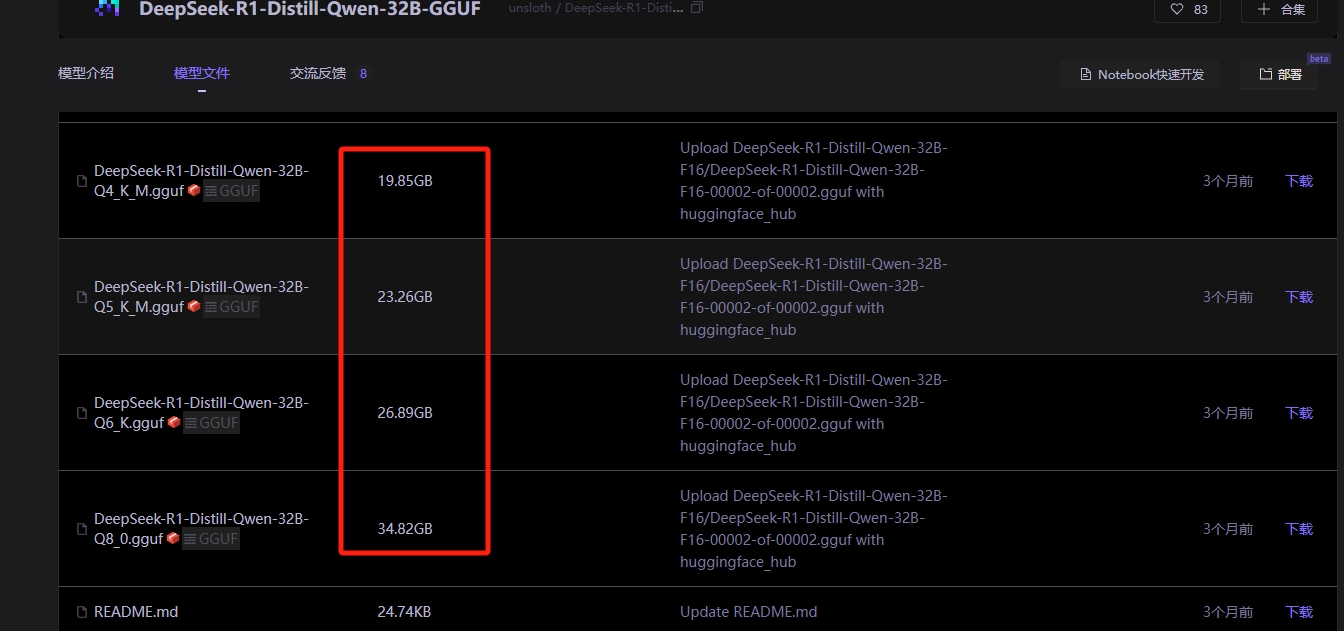
https://www.modelscope.cn/models/unsloth/DeepSeek-R1-Distill-Qwen-32B-GGUF/files

su - root
apt install curl git
curl -s https://packagecloud.io/install/repositories/github/git-lfs/script.deb.sh | bash
apt install git-lfs

cd /wks/models/deepseek/  #找了一个大空间目录
git lfs install
git clone https://www.modelscope.cn/unsloth/DeepSeek-R1-Distill-Qwen-32B-GGUF.git
文件全下载需要准备400-500G空间,可以单个下载或者下载后删除不常用的 - 模型文件大概200G,但下载的过程会缓存.git一份,因为需求空间加倍 - 下载完毕之后,可以手工删除.git文件 |
|
DeepSeek-R1-Distill-Qwen-32B https://www.modelscope.cn/models/deepseek-ai/DeepSeek-R1-Distill-Qwen-32B/files
pip install modelscope

#模型下载
from modelscope import snapshot_download
model_dir = snapshot_download('deepseek-ai/DeepSeek-R1-Distill-Qwen-32B')
sudo apt install curl git sudo curl -s https://packagecloud.io/install/repositories/github/git-lfs/script.deb.sh | bash sudo apt install git-lfs git lfs install git clone https://www.modelscope.cn/deepseek-ai/DeepSeek-R1-Distill-Qwen-32B.git |
mkdir -p /wks/models/modelscope_cache
export MODELSCOPE_CACHE=/wks/models/modelscope_cache

pip install modelscope -i https://pypi.tuna.tsinghua.edu.cn/simple
- Successfully installed modelscope-1.26.0

llm@ii:~$ which modelscope
/wks/python/langchain//bin/modelscope

下载完整模型库
modelscope download --model unsloth/DeepSeek-R1-Distill-Qwen-32B-GGUF

下载单个文件到指定本地文件夹(以下载README.md到当前路径下“dir”目录为例)
modelscope download --model unsloth/DeepSeek-R1-Distill-Qwen-32B-GGUF DeepSeek-R1-Distill-Qwen-32B-Q4_K_M.gguf --local_dir ./
import os

# 设置自定义缓存目录
os.environ['MODELSCOPE_CACHE'] = '/wks/models/modelscope_cache'

#snapshot_download用于下载整个模型仓库中的所有文件,而不是单个文件
from modelscope import snapshot_download
model_dir = snapshot_download('unsloth/DeepSeek-R1-Distill-Qwen-32B-GGUF')
|
|
|
|
|
本地部署·vllm
https://modelscope.cn/models/deepseek-ai/DeepSeek-R1

reasoning 英/ˈriːznɪŋ , ˈriːzənɪŋ/ 美/ˈriːznɪŋ , ˈriːzənɪŋ/
n. 推理;论证;推想;理性的观点
v. 推理;理解;思考;推断;推论
adj. 能推理的;有关推理的

使用 vLLM 本地部署 DeepSeek
https://zhuanlan.zhihu.com/p/27650814946

deepseek官方文档
https://api-docs.deepseek.com/zh-cn/api/deepseek-api
模型下载·git下载 前提:已安装好python环境 https://modelscope.cn/models/deepseek-ai/DeepSeek-R1-Distill-Qwen-1.5B/files apt install curl git curl -s https://packagecloud.io/install/repositories/github/git-lfs/script.deb.sh | bash apt install git-lfs root@uu:/wks/models# mkdir deepseek root@uu:/wks/models# chown -R deepseek:deepseek deepseek/ su - deepseek cd /wks/models/deepseek/ git lfs install git clone https://www.modelscope.cn/deepseek-ai/DeepSeek-R1-Distill-Qwen-1.5B.git deepseek@uu:/wks/models/deepseek/DeepSeek-R1-Distill-Qwen-1.5B$ rm -rf .git deepseek@uu:/wks/models/deepseek/DeepSeek-R1-Distill-Qwen-1.5B$ cd .. deepseek@uu:/wks/models/deepseek$ du -sh DeepSeek-R1-Distill-Qwen-1.5B/ 3.4G DeepSeek-R1-Distill-Qwen-1.5B/
git lfs install
git clone https://www.modelscope.cn/deepseek-ai/DeepSeek-R1-Distill-Qwen-14B.git

$ du -sh DeepSeek-R1-Distill-Qwen-14B/
28G     DeepSeek-R1-Distill-Qwen-14B/
|
pip install uvicorn -i https://pypi.tuna.tsinghua.edu.cn/simple
pip install vllm -i https://pypi.tuna.tsinghua.edu.cn/simple
pip install sse_starlette -i https://pypi.tuna.tsinghua.edu.cn/simple
vLLM 是一款专为 高效推理 设计的大语言模型框架,其基于 PagedAttention 算法,性能显著优于传统方案。 vllm也可以在CPU上进行安装 # 安装PyTorch CPU版本 pip install torch torchvision --index-url https://download.pytorch.org/whl/cpu pip install vllm VLLM的CPU安装是可行的,但性能会显著受限。建议根据实际需求(推理/训练)和硬件条件选择部署环境。 轻量化替代:若仅需在CPU上运行,可考虑使用VLLM的轻量化版本(如蒸馏模型)或降低输入分辨率/模型复杂度。 CUDA_VISIBLE_DEVICES=0,1 python -m vllm.entrypoints.openai.api_server --model ./path/deepseek_model --port 8000 --tensor-parallel-size 2 CUDA_VISIBLE_DEVICES=0,1 表示让程序看到设备 ID 为 0 和 1 的两个 GPU, 同时 --tensor-parallel-size 2 表示使用 2 个 GPU 进行张量并行计算,以加速推理过程。 其中./path/deepseek_model 指定模型文件路径,替换为本地自己的,--port 可自定义端口。 CUDA_VISIBLE_DEVICES=0 python -m vllm.entrypoints.openai.api_server --model /wks/models/deepseek/DeepSeek-R1-Distill-Qwen-1.5B --port 8000 注意事项 确保模型路径正确,文件无损坏。 推理服务启动后,可通过浏览器访问 http://localhost:8000 检查服务状态。 或观察终端输出,如果看到类似 INFO: Started server process 和 INFO: Uvicorn running on ... 的信息,则表示 vLLM 服务启动成功。 注意 GPU 显存: 启动 vLLM 服务会占用 GPU 显存。请确保您的 GPU 显存足够运行模型。如果显存不足,可能会导致启动失败或运行缓慢。您可以尝试减小 --max-model-len 参数或使用更小规模的模型。 如果启动 vLLM 服务时遇到 CUDA 相关错误,请检查您的 NVIDIA 驱动版本和 CUDA 环境是否正确安装。 |
|
DeepSeek-R1-Distill-Qwen-32B模型与deepseek-r1:32b模型区别 ### 训练方式 - **DeepSeek-R1-Distill-Qwen-32B**:是通过知识蒸馏技术从 DeepSeek-R1 模型中蒸馏出来的。它以 Qwen2.5-32B 为基础,使用 DeepSeek-R1 生成的样本进行微调。 - **DeepSeek-R1:32b**:是 DeepSeek-R1 系列中的一个版本,经过了完整的多阶段训练过程以及强化学习调整。 ### 参数量与架构 - **DeepSeek-R1-Distill-Qwen-32B**:参数量为 32B,基于 Qwen 架构。 - **DeepSeek-R1:32b**:参数量同样为 32B,但其架构是 DeepSeek-R1 的原始架构。 ### 性能表现 - **推理能力**:DeepSeek-R1-Distill-Qwen-32B 在推理能力上表现出色,推理速度比原始模型提高了约 50 倍。在数学、代码与推理任务上,其性能超越了 OpenAI-o1-mini。 - **速度与资源消耗**:通常情况下,蒸馏版本的模型在推断过程中速度更快,计算成本更低。因此,DeepSeek-R1-Distill-Qwen-32B 在资源消耗方面可能更具优势。 - **精度与泛化能力**:DeepSeek-R1:32b 作为未经蒸馏的完整模型,在更多样化的测试集上可能展示出更强的表现力,尤其是在面对未见过的数据分布时,能够保持较高的预测质量。 ### 适用场景 - **DeepSeek-R1-Distill-Qwen-32B**:更适合在资源有限的环境中使用,例如在普通消费级硬件上进行部署。它适用于需要高效推理和较低硬件成本的场景。 - **DeepSeek-R1:32b**:更适合需要高精度和强大推理能力的复杂任务,尤其是在专业领域和研究场景中。 |
pip uninstall vllm

pip install torch==2.4.0 torchaudio==2.4.0 torchvision==0.19.0 transformers==4.44.0   -i https://pypi.tuna.tsinghua.edu.cn/simple

pip install tokenizers==0.19.1 triton==3.0.0 vllm==0.5.5 vllm-flash-attn==2.6.1  -i https://pypi.tuna.tsinghua.edu.cn/simple

vllm==0.5.5出来的时间是2024年8月,也就是说其他依赖包差不多也要这个时间的
Successfully installed audioread-3.0.1 datasets-3.4.1 dill-0.3.8 fsspec-2024.12.0 gguf-0.9.1 lazy_loader-0.4 librosa-0.11.0 lm-format-enforcer-0.10.6 multiprocess-0.70.16 nvidia-cublas-cu12-12.1.3.1 nvidia-cuda-cupti-cu12-12.1.105 nvidia-cuda-nvrtc-cu12-12.1.105 nvidia-cuda-runtime-cu12-12.1.105 nvidia-cufft-cu12-11.0.2.54 nvidia-curand-cu12-10.3.2.106 nvidia-cusolver-cu12-11.4.5.107 nvidia-cusparse-cu12-12.1.0.106 nvidia-nccl-cu12-2.20.5 nvidia-nvtx-cu12-12.1.105 outlines-0.0.46 pooch-1.8.2 pyairports-2.1.1 pyarrow-19.0.1 soundfile-0.13.1 soxr-0.5.0.post1 tokenizers-0.19.1 torch-2.4.0 torchvision-0.19.0 transformers-4.44.0 triton-3.0.0 vllm-0.5.5 vllm-flash-attn-2.6.1 xformers-0.0.27.post2 xxhash-3.5.0 |
deepseek@uu:~$ CUDA_VISIBLE_DEVICES=0 python -m vllm.entrypoints.openai.api_server --model /wks/bigmodels/DeepSeek-R1-Distill-Qwen-1.5B --port 8000  --max-model-len 4096


nohup CUDA_VISIBLE_DEVICES=0 python -m vllm.entrypoints.openai.api_server --model /wks/bigmodels/DeepSeek-R1-Distill-Qwen-1.5B --port 8000  --max-model-len 4096 >/tmp/vllm_dp15.log 2>&1 &

4096使用了6G显存
deepseek@uu:~$ nvidia-smi
Tue Mar 25 13:51:03 2025
+-----------------------------------------------------------------------------------------+
| NVIDIA-SMI 560.41                 Driver Version: 561.03         CUDA Version: 12.6     |
|-----------------------------------------+------------------------+----------------------+
| GPU  Name                 Persistence-M | Bus-Id          Disp.A | Volatile Uncorr. ECC |
| Fan  Temp   Perf          Pwr:Usage/Cap |           Memory-Usage | GPU-Util  Compute M. |
|                                         |                        |               MIG M. |
|=========================================+========================+======================|
|   0  NVIDIA GeForce RTX 4070 ...    On  |   00000000:01:00.0  On |                  N/A |
| N/A   50C    P8              4W /   75W |    6786MiB /   8188MiB |      0%      Default |
|                                         |                        |                  N/A |
+-----------------------------------------+------------------------+----------------------+
https://www.modelscope.cn/models/deepseek-ai/DeepSeek-R1-Distill-Qwen-14B 两种启动方式 https://www.modelscope.cn/models/deepseek-ai/DeepSeek-R1 vllm serve /wks/models/deepseek/DeepSeek-R1-Distill-Qwen-1.5B --tensor-parallel-size 1 --max-model-len 10240 --enforce-eager vllm serve deepseek-ai/DeepSeek-R1-Distill-Qwen-32B --tensor-parallel-size 2 --max-model-len 32768 --enforce-eager python3 -m sglang.launch_server --model deepseek-ai/DeepSeek-R1-Distill-Qwen-32B --trust-remote-code --tp 2 https://www.modelscope.cn/models/deepseek-ai/DeepSeek-R1-Distill-Qwen-1.5B |
|
手工下载的访问方法 from openai import OpenAI client = OpenAI( base_url='http://127.0.0.1:8000/v1/', api_key='token', # 随意写 )
response = client.chat.completions.create(
    model='/wks/bigmodels/DeepSeek-R1-Distill-Qwen-1.5B', # ModelScope Model-Id
    messages=[
        {
            'role': 'user',
            'content': '你好'
        }
    ],
    stream=True
)

done_reasoning = False
for chunk in response:
    delta = chunk.choices[0].delta
    # print(delta)  #ChoiceDelta(content='你好', function_call=None, refusal=None, role=None, tool_calls=None)
    answer_chunk = delta.content
    if hasattr(delta, 'reasoning_content') and callable(getattr(delta, 'reasoning_content')):
        print("obj has a callable my_method")
        reasoning_chunk = delta.reasoning_content
        if reasoning_chunk != '':
            print(reasoning_chunk, end='',flush=True)
    elif answer_chunk != '':
        if not done_reasoning:
            print('\n\n === Final Answer ===\n')
            done_reasoning = True
        print(answer_chunk, end='',flush=True)
=== Final Answer ===

NoneAlright, the user just said "你好". That's Chinese for "hello".

I should respond in a friendly and welcoming manner.

I'll say "你好!有什么我可以帮你的吗?" which means "Hello! How can I assist you?"

That should be good to keep the conversation going.
think

你好!有什么我可以帮你的吗?
通过ModelScope下载的访问方法
from openai import OpenAI

client = OpenAI(
    base_url='https://api-inference.modelscope.cn/v1/',
    api_key='MODELSCOPE_SDK_TOKEN', # ModelScope Token
)

response = client.chat.completions.create(
    model='deepseek-ai/DeepSeek-R1-Distill-Qwen-14B', # ModelScope Model-Id
    messages=[
        {
            'role': 'user',
            'content': '你好'
        }
    ],
    stream=True
)
done_reasoning = False
for chunk in response:
    reasoning_chunk = chunk.choices[0].delta.reasoning_content
    answer_chunk = chunk.choices[0].delta.content
    if reasoning_chunk != '':
        print(reasoning_chunk, end='',flush=True)
    elif answer_chunk != '':
        if not done_reasoning:
            print('\n\n === Final Answer ===\n')
            done_reasoning = True
        print(answer_chunk, end='',flush=True)
|
|
python环境
启动ollama服务
root@uu:/# su - ollama
ollama@uu:~$ ollama serve &


adduser deepseek
echo '%deepseek ALL=(ALL) NOPASSWD:ALL' > /etc/sudoers.d/deepseek
su - deepseek

sudo mkdir -p /wks/python/deepseek/
sudo chown -R deepseek:deepseek /wks/python/deepseek/

sudo tar -xvf Python-3.11.11.tar.xz
sudo chown -R deepseek:deepseek  Python-3.11.11
cd /wks/python/soft/Python-3.11.11
./configure --prefix=/wks/python/deepseek/ --enable-optimizations


checking for stdlib extension module _sqlite3... yes
checking for stdlib extension module _tkinter... yes
checking for stdlib extension module _uuid... yes
checking for stdlib extension module zlib... yes
checking for stdlib extension module _bz2... yes
checking for stdlib extension module _lzma... yes
checking for stdlib extension module _ssl... yes
checking for stdlib extension module _hashlib... yes
checking for stdlib extension module _testcapi... yes
checking for stdlib extension module _testclinic... yes
checking for stdlib extension module _testinternalcapi... yes
checking for stdlib extension module _testbuffer... yes
checking for stdlib extension module _testimportmultiple... yes
checking for stdlib extension module _testmultiphase... yes
checking for stdlib extension module _xxtestfuzz... yes
checking for stdlib extension module _ctypes_test... yes
make
make install
cd /wks/python/deepseek/bin
ln -s python3 python
ln -s pip3 pip

export PYTHONHOME=/wks/python/deepseek
export PATH=$PYTHONHOME/bin:$PATH

which python
which pip
pip install --upgrade pip -i https://pypi.tuna.tsinghua.edu.cn/simple
pip install python-dotenv -i https://pypi.tuna.tsinghua.edu.cn/simple
pip install openai -i https://pypi.tuna.tsinghua.edu.cn/simple
|
ollama用户
- 在线安装ollama

deepseek
- 离线安装的ollama
- vllm 环境 ,torch2.4,transformer 4.44
|
|
1.5B CUDA_VISIBLE_DEVICES=0 python -m vllm.entrypoints.openai.api_server --model /wks/bigmodels/DeepSeek-R1-Distill-Qwen-1.5B --port 8000 --max-model-len 4096 CUDA_VISIBLE_DEVICES=0 python -m vllm.entrypoints.openai.api_server --model /wks/bigmodels/DeepSeek-R1-Distill-Qwen-1.5B --port 8000 --max-model-len 8192
from openai import OpenAI

client = OpenAI(
    base_url='http://127.0.0.1:8000/v1/',
    api_key='token', # ModelScope Token
)
流式
response = client.chat.completions.create(
    model='/wks/bigmodels/DeepSeek-R1-Distill-Qwen-1.5B', # ModelScope Model-Id
    messages=[{'role': 'user','content': '我要健康,但之间没有运行过,过开始适合做哪些运动',}],
    stream=True
)

done_reasoning = False
for chunk in response:
    delta = chunk.choices[0].delta
    print(delta)  #ChoiceDelta(content='你好', function_call=None, refusal=None, role=None, tool_calls=None)
    answer_chunk = delta.content
    if hasattr(delta, 'reasoning_content') and callable(getattr(delta, 'reasoning_content')):
        print("obj has a callable my_method")
        reasoning_chunk = delta.reasoning_content
        if reasoning_chunk != '':
            print(reasoning_chunk, end='',flush=True)
    elif answer_chunk != '':
        if not done_reasoning:
            print('\n\n === Final Answer ===\n')
            done_reasoning = True
        print(answer_chunk, end='',flush=True)
对于这个问题--max-model-len 4096不够用,需要将之调整为--max-model-len 8192

响应时间 15-19秒之间
流式的输出是一个单词一个单词的返回,但每个返回是带有func_call,可以使用tools

确保ChoiceDelta(content='每次', function_call=None, refusal=None, role=None, tool_calls=None)
每次ChoiceDelta(content='运动', function_call=None, refusal=None, role=None, tool_calls=None)
运动ChoiceDelta(content='都', function_call=None, refusal=None, role=None, tool_calls=None)
都ChoiceDelta(content='有效', function_call=None, refusal=None, role=None, tool_calls=None)
有效ChoiceDelta(content='且', function_call=None, refusal=None, role=None, tool_calls=None)
且ChoiceDelta(content='有趣', function_call=None, refusal=None, role=None, tool_calls=None)
有趣ChoiceDelta(content='。', function_call=None, refusal=None, role=None, tool_calls=None)
。ChoiceDelta(content='', function_call=None, refusal=None, role=None, tool_calls=None)
非流式
response = client.chat.completions.create(
    model='/wks/bigmodels/DeepSeek-R1-Distill-Qwen-1.5B', # ModelScope Model-Id
    messages=[{'role': 'user','content': '我要健康,但之间没有运行过,过开始适合做哪些运动',}],
    stream=False
)

print(response.choices[0].message.content)
嗯,我想要健康但没有进行过运动,但又想做一些适合的运动。这有点让我困惑,因为通常健康的人会经常运动,但也许我暂时不打算这样做。不过,为了长期的健康,我觉得还是需要进行一些运动,以保持活跃的体魄和增强体质。

那我应该做哪些适合的运动呢?首先,我想到的可能是跑步,因为它是全身性的运动,能帮助你提高心肺功能和肌肉力量。不过,有时候可能需要先做一些热身运动,比如慢跑、骑自行车或者进行简单的拉伸,以确保你有足够的能量来完成跑步。

接下来,瑜伽可能也是一个不错的选择。瑜伽可以增强动作的灵活性和力量,同时有助于放松身心,恢复肌肉和关节。我可能会选择一些简单的瑜伽动作,比如平板支撑、深蹲或者仰卧起坐,这些动作对身体来说都很适合,而且练习起来也不需要太多的时间。

另外,游泳也是一个不错的选择。游泳不仅能帮助你放松身心,还能提升心肺功能和耐力。不过,游泳可能需要一定的体力,所以一开始可能需要先进行一些热身运动,比如游泳或慢跑,确保你有足够的体力来完成游泳动作。

力量训练也是一个好的选择,特别是如果有时间的话。我可以选一些简单但有效的力量训练,比如深蹲、素数引体向上、俯卧撑等。这些力量训练可以帮助我增强肌肉力量,同时也有助于饮食的调整,比如多摄入蛋白质和健康脂肪,减少脂肪的摄入量。

力量训练需要一些时间,所以我可能会先进行热身运动,比如慢跑或散步,确保我能保持足够的体力来完成这些力量训练。此外,力量训练后还可以进行一些休息和恢复,这样有助于身体恢复,避免受伤。

最后,力量训练也可以帮助我保持良好的状态,提升自信心,这些都对长期的健康有帮助。如果我开始进行力量训练,我可能会先享受一段时间的放松和恢复,然后再逐渐增加强度,确保自己能够不断进步。

不过,我需要注意的是,任何运动都需要适量的饮食和充足的睡眠,才能保证健康。我可能会先调整饮食,多吃一些蛋白质ated的食材,比如鱼、肉类和豆类,同时避免过多的脂肪和碳水化合物。充足的睡眠也很重要,所以我会确保每天都有足够的休息时间,避免熬夜。

综上所述,我应该先进行热身运动,然后是瑜伽、游泳或力量训练,最后是放松和休息。这样不仅有助于保持健康,还能帮助我逐步恢复并提升自己的身体和心理状态。
think

为了保持健康且不进行运动,建议先进行热身运动,然后是瑜伽、游泳或力量训练。
热身运动可以帮助你调整 your body 和 mind,准备好进入运动状态。
瑜伽和力量训练则可以帮助你增强肌肉力量和整体身体素质。
游泳则是一个适合身体条件较好的选择。
最后,放松和休息是恢复和增强身体的重要步骤。
通过这些方法,你可以逐步恢复健康,同时享受放松和提升自我带来的成就感
10.8秒
|
|
|
|
|
|
|
参考